
티스토리 뷰
객체(Object)
● 관련된 데이터와 함수의 집합
● 자바스크립트에서 여러 자료를 다 다룰 때 객체를 사용
● 객체 안의 변수를 속성(property), 함수를 메서드(method)라고 부름
1. 객체의 형식
const 객체명 = {
		 속성:값,  //key : value
		 속성:값,
     메서드 : function( ){    // 화살표 함수는 메서드를 사용하지 않음
				     실행문
				     },
		function 메서드명(){
			실행문
		 },
			...
}


// 값에는 자바스크립트의 모든 값이 올 수 있음
2. 객체의 속성(key)에 접근
a. 객체.속성
b. 객체["속성"]
c. this : 자기 자신이 가진 속성이라는 표시
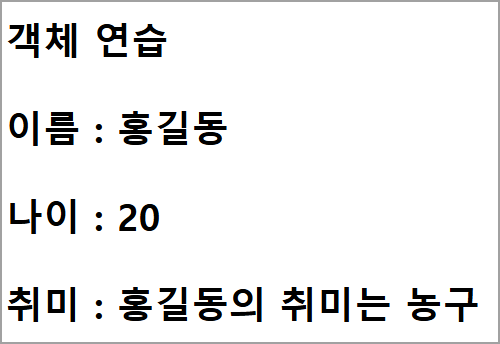
<!DOCTYPE html>
<html lang="ko">
<head>
  <meta charset="UTF-8">
  <meta name="viewport" content="width=device-width, initial-scale=1.0">
  <title>Document</title>
  <script>
    document.addEventListener("DOMContentLoaded",function(){
  /*  사람이라는 객체 만들기
      사람의 특징: 이름, 나이, 성별 => 속성(=property)
      사람의 동작(=행동): 농구를 한다, 커피를 마신다.=> method

      객체명 : person
      속성 : 이름(name), 나이(age), 성별(gender)
      메서드 : 운동을 받아서 처리
              hobby(kind)
  */
    const div = document.querySelector("#json");
    const h2 = document.querySelectorAll(".content"); //h2 전체를 배열에 담음
    // [<h2 class="content"></h2>, <h2 class="content"></h2>,<h2 class="content"></h2>,...]

    const person = {
        // 속성 : 값,   key:value -> key - 중복불가
        name : "홍길동",
        age : 20,
        gender : "남",
        hobby : function(kind){
          return this.name + "님의 취미는 " + kind + "입니다";
          //this : 자기 자신 객체(person)
        },
        hobby1 : (kind)=>{
          //return this.name + "님의 취미는 " + kind + "입니다";
          //화살표 함수에서의 this는 상황에 따라 다르며
          //여기에서는 window 객체
          // 객체 안에서 this를 사용하기 위해서는 화살표 함수를 쓰지 않음
          return person.name  + "님의 취미는 " + kind + "입니다";
        }
    }

    // div.textContent = `${person}`; //[object Object]
    // div.textContent = `${JSON.stringify(person)}`;
    h2[0].textContent=`이름 : ${person.name}`;//객체명.속성명
    h2[1].textContent=`나이 : ${person.age}`;
    h2[2].textContent=`성별 : ${person.gender}`;
    h2[3].textContent=`취미 : ${person.hobby("농구")}`;

    // 객체의 속성의 값을 수정
    person.name = "이경희";
    person.age = 30;
    h2[4].textContent=`이름 : ${person.name}`;//객체명.속성명
    h2[5].textContent=`나이 : ${person.age}`;

    //속성을 추가
    person.addr = "신촌";
    h2[5].textContent=`주소 : ${person.addr}`;
   // div.textContent = `${JSON.stringify(person)}`;

    //속성을 제거
    delete person.gender;

    console.log(person);

    div.textContent = `${JSON.stringify(person)}`;

    });//end of document
  </script>
</head>
<body>
  <h나이 : 201>객체 연습</h1>
  <h2 class="content"></h2>
  <h2 class="content"></h2>
  <h2 class="content"></h2>
  <h2 class="content"></h2>
  <h2 class="content"></h2>
  <h2 class="content"></h2>
  <div id="json"></div>
</body>
</html>
3. 객체 추가
● 객체.속성 = 값
● 객체["속성'] = 값
person.addr = "강남"
person["addr'] = "신촌"
4. 객체 삭제
● delete 객체.속성
● delete 객체["속성"]
delete person.gender;
delete person["gender"]
<script>
  const hong ={
    name : "홍길동",
    age : 20,
    hobby:function(kind){
      return `${this.name}님은 취미가 ${kind}입니다.`;
    } //end of hobby
  }//end of hong

  //JSON 형식으로 객체를 확인
  console.log(JSON.stringify(hong, null, 2)); // JSON.stringify(hong)
  //JSON 형식으로 변환시 메서드는 변환하지 못함

  //객체의 속성과 메서드를 확인
  console.log(`이름 : ${hong.name}`);
  console.log(`나이 : ${hong.age}`);
  console.log(`취미 : ${hong.hobby("축구")}`);
  // hong["name"] => hong.name


  //객체 추가
  hong.addr = "강남";
  hong.score = [10, 20, 30];
  console.log(JSON.stringify(hong, null, 2));

  //객체 삭제
  delete hong.age;
  document.write(JSON.stringify(hong, null, 2));
  document.write("<br>"+ hong); //[object Object]

</script>
<!DOCTYPE html>
<html lang="ko">
<head>
  <meta charset="UTF-8">
  <title>Title</title>
  <script>
    document.addEventListener("DOMContentLoaded", function (){
      const person={
        name : "홍길동",
        age : 20,
        hobby : function (kind){
                    return this.name + "의 취미는 " + kind;
                  },
        run(place){
		        return this.name + "님이 " + place + "로 달립니다.";
        },
        gender : "남성"
      }

      //객체의 키와 값을 동적으로 생성
      person.score = [90, 100, 85];

      //객체의 키와 값을 동적으로 제거
      delete person.gender;

      const h3 = document.querySelectorAll(".content");
      h3[0].textContent = "이름 : " +  person.name;
      h3[1].textContent = "나이 : " + person.age;
      h3[2].textContent = "취미 : "  + person.hobby("농구");
      h3[3].textContent = "달린다 : "  + person.run("축구장");
      h3[4].textContent = "성별 : "  + person.gender;  //위에서 삭제 했음, 결과 확인
      h3[5].textContent = "성적 : " + person.score[0];
      });
  </script>

</head>
<body>
 <h3>객체 연습</h3>
 <h3 class="content"> </h3>
 <h3 class="content"> </h3>
 <h3 class="content"> </h3>
 <h3 class="content"> </h3>
 <h3 class="content"> </h3>
  <h3 class="content"> </h3>
</body>
</html>
5. 자바스크립트의 자료형
● 기본 자료형(primitives) : 숫자,문자열,불
○ 속성을 가질 수 없음
● 객체 자료형(object) : 함수,배열,......
6. 기본 자료형을 객체로 선언
const 객체 = new 객체_자료형_이름();

new Number(10);
new String("Hi Javascript");
new Boolean(true);
Number 객체
1. toFixed() : 숫자 N 번째 자릿수까지 출력
소수점 이하 자릿수를 정해서 출력 할 때 사용
반올림 됨
let a = 357.90283
a.toFixed(2)  ⇒ 357.90
// toFixed(소수이하자릿수)
2. NaN(Not a Number)
숫자로 나타낼 수 없는 숫자를 의미
NaN인지 확인 : Number.isNaN()
3. 무한대(Infinity)인지 확인
Number.isFinite() : 유한인지 확인
무한대는 비교 연산이 가능
<script>
  const m = Number("3000원");
  console.log(m);  //NaN
  console.log(m===NaN);  //false
  console.log(Number.isNaN(m));  //true

  const n = 5/0;
  console.log(n); //Infinity

  const n1 = -5/0;
  console.log(n1); //-Infinity
  console.log(Number.isFinite(n)); //false
  console.log(Number.isFinite(n1)); //false

  //일반적으로 숫자는 셀수 있으므로 true가 나옴
  //isFinite() : 유한인가
  console.log(Number.isFinite(1)); //true
  console.log(Number.isFinite(-1)); //true

  //무한대는 비교 연산이 가능
  console.log(n===Infinity || n1===-Infinity); //true
</script>
String 객체
1. trim() : 문자열 양쪽 끝의 공백(띄어쓰기, 줄바꿈) 없애기
2. split() : 문자열을 특정 기호로 나누기
<script>
const str = "가나다\nJavascipt\nABC";
const sp= str.split("\n");

document.write(sp + "<br>"); //가나다,Javascipt,ABC

for(let s of sp){
  document.write(s + "<br>");
}
/*
가나다
Javascipt
ABC
*/
</script>
M MDN Web Docs String - JavaScript | MDN
https://developer.mozilla.org/ko/docs/Web/JavaScript/Reference/Global_Objects/String
String - JavaScript | MDN
String 전역 객체는 문자열(문자의 나열)의 생성자입니다.
developer.mozilla.org
더 많은 메소드가 있지만 여기서는 생략
Math 객체
1. Math.random() 메서드
0≤결과∠1의 범위만 생성
M MDN Web Docs Math - JavaScript | MDN
https://developer.mozilla.org/ko/docs/Web/JavaScript/Reference/Global_Objects/Math
Math - JavaScript | MDN
Math 는 수학적인 상수와 함수를 위한 속성과 메서드를 가진 내장 객체입니다. 함수 객체가 아닙니다.
developer.mozilla.org
배열 기반 다중 할당
[식별자,식별자,...] = 배열
<script>

 let [a, b, c] = [1, 2, 3];
document.write("a = " + a + "<br>"); //a = 1
document.write("b = " + b + "<br>"); //b = 2
document.write("c = " + c + "<br>"); //c = 3

 const arr = [0, 1, 2, 3];
 let [aa, bb, cc, dd] = arr;

 document.write("aa = " + aa + "<br>"); //aa = 0
 document.write("bb = " + bb + "<br>"); //bb = 1
 document.write("cc = " + cc + "<br>"); //cc = 2
 document.write("dd = " + dd + "<br>"); //dd = 3

[a, b] = [b, a] ;
document.write("a = " + a + "<br>"); //a = 2
document.write("b = " + b + "<br>");  //b = 1
</script>
객체 기반의 다중 할당
최신 자바 스크립트에서는 객체 내부에 있는 속성을 꺼내어 변수로 할당할 때 아래와 같은 형식을 사용
{ 속성명, 속성명 } = 객체
{ 식별자 = 속성명, 식별자 = 속성명} = 객체
<script>

const student = {
  name : "홍길동",
  age : 20,
  grade : "A",
  hobby:function(kind){
    return this.name + "님의 취미는 " + kind + "입니다.";
  }
}


//객체에서 변수 추출
const {name, age} = student;
document.write(`name :${name} <br>`);
document.write(`name :${age} <br>`);

document.write(`${student.hobby("soccer")} <br>`);
</script>
배열 전개 연산자
1. 얕은 복사(=참조복사)
배열을 복사한 경우, 배열의 참조 주소가 복사 됨
배열만 다를 뿐 같은 참조 주소를 가지게 됨
2. 깊은 복사
배열의 내용만 복사 되며,두 배열은 완전히 독립적으로 작동
전개 연산자를 이용하여 배열 복사
[…배열]
[...배열, 자료, 자료, 자료]
[자료, ...배열, 자료]
<script>
let fruits = ["apple","grape"];

//얕은 복사
document.write("** 참조(옅은) 복사 ** <br>");
let ref_fruits = fruits;

document.write(`furits : ${fruits}<br>`);
document.write(`copy_furits : ${ref_fruits}<br>`);
document.write("================<br>");

//요소 추가
ref_fruits.push("melon");
ref_fruits.push("orange");

document.write(`furits : ${fruits}<br>`);
document.write(`copy_furits : ${ref_fruits}<br>`);
document.write("================<br><br>");

document.write("** 깊은 복사 ** <br>");

//깊은 복사
let product = ["커피", "콜라"];
let deep_product = [...product];

document.write(`product : ${product}<br>`);
document.write(`deep_product : ${deep_product}<br>`);

deep_product.push("홍차");
deep_product.push("라떼");

document.write("================<br>");
document.write(`product : ${product}<br>`);
document.write(`deep_product : ${deep_product}<br>`);
document.write("================<br><br>");

let deep_product_1 = ["식빵", ...product, "녹차"];
document.write(`product : ${product}<br>`);
document.write(`deep_product : ${deep_product_1}<br>`);
</script>
객체 전개 연산자
객체를 깊은 복사할 때 사용
{...객체}
{...객체, 자료, 자료}  // ...객체 복사
{자료, 자료, ...객체} // 뒤에 객체를 복사하는  복사하는 객체와 같은 속성이 있을 경우 뒤 객체의 속성값으로 변경됨
<script>
const hong = {
  name : "홍길동",
  age : 20,
  score : 95
}

document.write(`<h1> **  객체 옅은 복사 ** </h1>`);
const gildong = hong;

gildong.name = "김산";
gildong.age = 10;

document.write(`<h1> ${ JSON.stringify(hong)} </h1>`);
document.write(`<h1> ${ JSON.stringify(gildong)} </h1>`);
document.write("<br><hr><br>");

document.write(`<h1> **  객체 깊은 복사 ** </h1>`);
const lee ={
  name : "이경희",
  age:30,
  score:100
};

const deepcopy_lee = {...lee};
deepcopy_lee.name = "둘리";
deepcopy_lee.age = 23;
deepcopy_lee.score = 60;

document.write(`<h1> ${ JSON.stringify(lee)} </h1>`);
document.write(`<h1> ${ JSON.stringify(deepcopy_lee)} </h1>`);
document.write("<br><hr><br>");


document.write(`<h1> **  객체의 필요한 부분만 복사 ** </h1>`);
const park = {
  name:"희나리",
  hobby:"축구",
  alias:"또치",
  ...lee        // 뒤에 복사시 같은 속성이 존재할 경우 뒤 객체의 속성의 value로 변경
}
document.write(`<h1> ${ JSON.stringify(lee)} </h1>`);
document.write(`<h1> ${ JSON.stringify(park)} </h1>`);
document.write("<br><hr><br>");


</script>
'Front-End Programming > JavaScript' 카테고리의 다른 글
| JSON (0) | 2025.03.22 |
|---|---|
| 배열 반복(Array Iteration) (0) | 2025.03.22 |
| 함수(Function) (0) | 2025.03.18 |
| 배열(Array) (3) | 2025.03.18 |
| 제어문 (0) | 2025.03.18 |