
티스토리 뷰
함수(Function)
★ 함수
1. 함수 : 코드의 집합
자바스크립트에서는 함수도 하나의 자료라서 변수에 할당할 수 있고,
함수를 함수의 매개변수로 전달해서 활용할 수 있음
자바스크립트는 함수와 변수가 굉장히 유연함
2. 함수를 사용하는 목적
● 반복되는 코드를 한 번만 정의해 놓고 필요할 때마다 호출해서 사용(재사용성)
● 기능별로 분류를 함으로써 모듈화 가능
● 유지보수가 수월
● 가독성이 좋아짐
3. 함수 용어
a. 함수 호출 : 함수를 사용하는 것
b. 매개변수 : 함수를 호출할 때 괄호 내부에 여러 가지 자료를 넣을 수 있는데 이 때 이 자료
c. 리턴값 : 함수를 호출해서 최종적으로 나오는 결과 반환
★ 선언적 함수 / 익명 함수 /콜백 함수
1. 선언적 함수(function declaration)
a. 순차적인 코드 실행이 일어나기 전에 생성
b. 같은 블록이라면 어디에서 함수를 호출해도 괜찮음
c. 선언적 함수를 생성하기 전에 함수를 호출해도 함수가 이미 생성된 상태이므로 문제 없이 실행
d. 함수의 이름이 있는 함수
function 함수명( ) {
		 실행문
}

//함수 호출
함수명()


function 함수명( 매개변수, ….) {
		 실행문
 }

 //함수 호출
 함수명(인수, ...)
 //인수 - 매개변수에 전달할 값


 function 함수명( 매개변수, ….) {
		 실행문

		 retrun 반환값
 }

  함수명(인수,...)
<script>
// 1 ~ 5까지의 자연수의 합
let sum = 0;
for(let i=1; i<=5; i++){
  sum = sum + i; // sum += i;
}
//3~300 까지의 자연수의 합
let sum1 = 0;
for(let i=3; i<=300; i++){
  sum1 += i;
}
//500 ~ 700까지의 자연수의 합
let sum2 = 0;
for(let i=500; i<=700; i++){
  sum2 += i;
}

document.write(sum + "<br>");
document.write(sum1 + "<br>");
document.write(sum2 + "<br>");


</script>

//---------------------------------

<script>
// function 함수명(){실행 할 문장}
// function 함수명(매개 변수, .. ){
//   실행할 문장
// }

//함수 선언
function total(start, end){
  let sum = 0;
  for(let i=start; i<=end; i++){
    sum = sum + i; // sum += i;
  }//end of for
  document.write(sum + "<br>");
  return;    //생략되어 있음, 자신을 호출한 곳으로
             //되돌아 가라
 // document.write("aaaa"); - 리턴 뒤 문장은 실행 안됨
}//end of total

//함수 호출
total(1, 5);

</script>

//----------------------------------
<script>
//함수 선언
function total(start, end){
  let sum = 0;
  for(let i=start; i<=end; i++){
    sum = sum + i; // sum += i;
  }//end of for

  return sum; // 자신을 호출한 곳으로 sum에 담긴 값을 가지고 되돌아감
}//end of total

//함수 호출
let result = total(1, 5);

document.write(result + "<br>");


</script>
<script>
//문) "안녕!! 즐거운시간!!"이 3번 출력되도록 함수 만들기
//함수명: hello();
//function 함수명(){}
function hello(){
  for(let i=1; i<=3; i++){
    document.write("안녕!! 즐거운시간!! <br>");
  } //end of for
  //return;
}//end of hello

//함수 호출
hello();


//문) 3 + 2,  4 + 7, 9 + 20와 같이 매개변수를 2개 받아 처리하는 함수
//document.write();
//return으로 결과 돌려주기
// 결과를 받아서 출력하기
// add(3, 2);  //5
// add(4,7); //11
// add(9, 20);  //29
function add(num1, num2){
  //  let sum = num1 + num2;
  //  return sum;
   return num1 + num2;
}
                          // 함수 호출
document.write("3 + 2 = " + add(3, 2) + "<br>");
document.write("4 + 7 = " + add(4, 7) + "<br>");
document.write("9 + 20 = " + add(9, 20) + "<br>");

</script>
2. 익명 함수(Anonymous Function)
a. 함수에 이름이 없는 함수 즉, 함수를 출력할 때 별다른 이름이 붙어 있지 않은 함수
b. 변수에 결과를 저장
c. 순차적인 코드 실행에서 코드가 해당 줄을 읽을 때 생성
function( ) {
	실행문
}

function(매개변수,....){
   실행문
 }

 function(매개변수,....){
   실행문

   return 반환값
 }


 // 화살표 함수

 ( ) => {
		 실행문
	}

 (매개변수, ... ) {
     실행문
  }

  //-------------

 const fun1 = function() {
		 실행문
 }

  //함수 호출
  fun1();

 const fun2 = function (매개변수,...){
	 실행문
	}

	//함수 호출
	 fun2(인수, 인수,...);

 const fun3 = function() {
		 실행문

		 retrun 반환값;
  }

 const fun4 = function (매개변수,...){
	 실행문

	 		retrun 반환값;
	}


const fun5 = ( ) => {
		실행문

	}

const fun6 = (매개변수,.... ) => {
		실행문
	}

const fun7 = ( ) => {
		실행문

		return 반환값;
	}

const fun8 = (매개변수,.... ) => {
		실행문

		return 반환값;
	}
3. 화살표 함수(Arrow Function)
a. 콜백함수(함수를 매개변수로 받는 함수)에 주로 사용
b. 익명적 함수를 ( ) => { }로 변경
익명:  function(){
                  실행할 문장
                 }
 화살표 : () => { 실행할 문장 }

 익명 : function(매개변수,.....){
         // 매개변수 - 외부로부터 전달 받은 자료를 담는 변수
                  실행할 문장
            }
  화살표 : (매개변수,....) => { 실행할 문장 }
<script>
//문) Hi!! Javascrpt를 3번 출력하는 익명함수

//1. 익명적 함수를 선언
const hello = function(){

  for(let i=1; i<=3; i++){
    document.write("Hi!! Javascrpt <br>");
  }//end of for

}//end of function

//2. 함수 호출
hello();

//3. 화살표 함수 선언
const hello1 = ()=>{

for(let i=1; i<=3; i++){
  document.write("Hi!! Javascrpt <br>");
}//end of for

}//end of function

//4. 함수 호출
hello1();

</script>
<script>
//문) 3 + 2,  4 + 7, 9 + 20와 같이 매개변수를 2개 받아
// 처리하는 익명 함수와 화살표 함수

//1. 익명적 함수 선언
const add = function(n1, n2){
    return n1 + n2;
}//end of function

//2. 함수를 호출
document.write("3 + 2 = " + add(3, 2) + "<br>");
document.write("4 + 7 = " + add(4, 7) + "<br>");
document.write("9 + 20 = " + add(9, 20) + "<br>");

//3. 화살표 함수
const add1 = (n1, n2)=>{
    return n1 + n2;
}//end of function

//4. 함수 호출
document.write("3 + 2 = " + add1(3, 2) + "<br>");
document.write("4 + 7 = " + add2(4, 7) + "<br>");
document.write("9 + 20 = " + add3(9, 20) + "<br>");


</script>
4. 콜백(Callback) 함수
자바스크립트는 함수도 하나의 자료형이므로 매개변수로 전달할 수 있음
이렇게 매개변수로 전달하는 함수를 callback 함수라고 함
● 함수를 3번 호출
    // 콜백 함수 선언
    function callbackFunction1(callback){  // 매개변수로 함수를 전달함
      for(let i=0; i<3; i++){
        callback(i);  // 매개변수가 함수이므로 호출 가능함
      }
    }

    //선언적 함수
    function show(i){
      alert(`${i}번째 함수 호출`);
    }

     // 함수 호출
     callbackFunction1(show);
    // 콜백 함수 선언
  function callbackFunction1(callback){  // 매개변수로 함수를 전달함
      for(let i=0; i<3; i++){
        callback(i);  // 매개변수가 함수이므로 호출 가능함
      }
    }


  //function test(){ }  ;
  // => function 함수명(){ }   => 선언적 함수

  //function(){ };  => 익명적 함수

  //익명적 함수
  let show = function(i){
    alert(`익명 ${i}번째 함수 호출`);
  };

	  callbackFunction1(show);
    // 콜백 함수 선언
  function callbackFunction1(callback){  // 매개변수로 함수를 전달함
      for(let i=0; i<3; i++){
        callback(i);  // 매개변수가 함수이므로 호출 가능함
      }
    }


  callbackFunction1(function(i){
  alert(`${i}번째 함수 호출`);
});
● 매개변수로 배열과 콜백 함수 받기 및 배열 함수, 화살표 함수
○ forEach() : 배열이 가지고 있는 메서드(함수)로써 단순하게ㅐ
배열 내부의 요소를 사용해서 콜백 함수를 호출
○ filter() : 콜백 함수에서 리턴하는 값이 true인 것들만 모아서 새로운 배열을 만드는 함수
○ map() : 콜백 함수에서 리턴한 값들을 기반으로 새로운 배열을 만드는 함수
<!DOCTYPE html>
<html lang="ko">
<head>
  <meta charset="UTF-8">
  <title>Title</title>
<!-- <script>
    const test_fun = function (callback_fun){
      for(let i=1; i<5; i++){
        callback_fun(i);
      }
    }

    function test_print(i){
      document.write(`${i} 번째 함수 호출 <br>`);
    }

   test_fun(test_print)

   //  test_fun((i) => {
   //    document.write(`${i} 번째 함수 호출 <br>`);
   //  });

  </script>
-->
  <script>
    const test_fun = function (array, callback_fun){
      for(const elem of array){
        callback_fun(elem)
      }
    }

    // function test_print(i){
    //   document.write(`${i} <br>`);
    // }
    //
    // test_fun([10, 20, 30], test_print)

     test_fun([10, 20, 30], (콜백함수_매개변수) => {
       document.write(`${콜백함수_매개변수} <br>`);
     });

     //===================================
    //forEach함수 활용
    // const numbers1=[100, 200, 300]
    // numbers1.forEach(function (value, index){
    //   console.log(`${index}번째 요소 ${value}`)
    // });

    numbers1.forEach((value, index) => {
      console.log(`${index}번째 요소 ${value}`)
    });

     //filter함수 활용
    const numbers2=[50, 73, 35, 2, 96, 102]
    // let filter_result=numbers2.filter(function (value, index){
    //   return value % 2 === 0;
    // });

    let arr_filter=numbers2.filter((value, index) => value % 2 === 0;);

    console.log(arr_filter);

    //map() 함수 이용
    // let map_result = numbers2.map(function (value, index){
    //   return value + 10;
    // });

    let map_result = numbers2.map((value, index) => value + 10; );
   console.log(map_result);

   //============================
   const myForEach = function (arr, call_fun){
      for(let i=0; i<arr.length; i++){
        const element = arr[i];
        call_fun(element, i);
      }
    }

    myForEach([10, 20, 30], (value, i) =>{
      document.write(`${i}번째 요소 ${value} <br>`)
    });

  </script>
</head>
<body>

</body>
</html>
예제
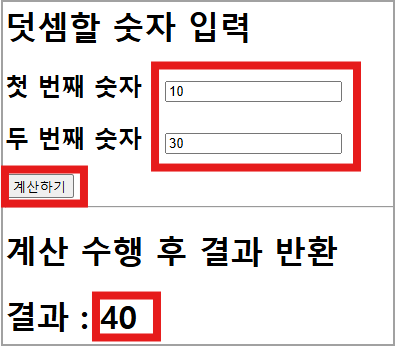
<!DOCTYPE html>
<html lang="ko">
<head>
  <meta charset="UTF-8">
  <meta name="viewport" content="width=device-width, initial-scale=1.0">
  <title>Document</title>
  <!-- 외부 스타일 시트 -->
  <link href="../css/base.css" rel="stylesheet" type="text/css">

  <!-- 외부 스크립트 가져오기 -->
  <script src="myFun.js"></script>
  <script>
   document.addEventListener("DOMContentLoaded",()=>{
      //1. 본문 태그 읽기
      const h3 = document.querySelector("#calc");
      const button = document.querySelector("button"); // button[type='button']

      //2. 설명을 위한 연습용
      /*
      const h1 = document.querySelector("h1");
      const h4 = document.querySelector("h4");
      // let aa = h1.textContent; //두 수의 합 구하기
      // h4.textContent = aa;
      h4.textContent = h1.textContent; //두 수의 합 구하기
    */


    //3.'계산하기' 버튼을 클릭하면
    // button.addEventListener("click",function(){});
    button.addEventListener("click",()=>{
      //3-1. 입력된 숫자 읽어오기
      const num1 = Number(document.querySelector("input[name='num1']").value);
      const num2 = Number(document.querySelector("input[name='num2']").value);

      //3-2. 계산하기 위해 myCalc()함수 호출
      let result = myCalc(num1, num2);
      h3.textContent = `결과 : ${result}`;
    });

   });
  </script>
</head>
<body>

  <h1>두 수의 합 구하기</h1>
  <!-- <h4> </h4> -->
  <h3>첫 번째 숫자 : <input type="text" name="num1"></h3>
  <h3>두 번째 숫자 : <input type="text" name="num2"></h3>
  <button type="button">계산하기</button>

  <br>
  <hr>
  <h2>계산 결과 보기</h2>
  <h3 id="calc"></h3>
</body>
</html>
● 위 계산기 업그레이드

<!DOCTYPE html>
<html lang="ko">
<head>
<meta charset="UTF-8">
<meta name="viewport" content="width=device-width, initial-scale=1.0">
<title>Document</title>
<script>
const myCalc1 = (num1, operator, num2)=>{
let result = 0;
switch(operator){
case "+" :
result = num1 + num2;
break;
case "-" :
result = num1 - num2;
break;
case "*" :
result = num1 * num2;
break;
case "/" :
result = num1 / num2;
break;
}
return result;
}
document.addEventListener("DOMContentLoaded", ()=>{
//1. 결과를 출력할 본문의 태그 읽어오기
const h3 = document.querySelector("#calc");
const button = document.querySelector("button");
//2. '계산하기'버튼을 클릭하면 처리할 함수
button.addEventListener("click",()=>{
//2-1. 계산에 필요한 값을 읽어 오기
const num1 = Number(document.querySelector("input[name='num1']").value);
const operator = document.querySelector("select").value;
const num2 = Number(document.querySelector("input[name='num2']").value);
//2-2. 입력이 올바른지 확인
// alert(`${num1}, ${operator}, ${num2}`);
//2-3. 계산을 위한 함수를 호출
let result = myCalc1(num1,operator, num2);
h3.textContent = `결과 : ${result}`;
});
});
</script>
</head>
<body>
첫 번째 숫자 : <input type="text" name="num1">
<select >
<option value="+">+</option>
<option value="-">-</option>
<option value="*">*</option>
<option value="/">/</option>
</select>
두 번째 숫자 : <input type="text" name="num2">
<button type="button">계산하기</button>
<br>
<hr>
<h3 id="calc"></h3>
</body>
</html>
● 문) 매개변수 x,y로 인수를 받아 곱한 값을 반환하는 multiply() 함수 만들기
● 문) 두 개의 숫자를 더하기하는 프로그램
4. 타이머 함수
a. 타이머 함수
● setTimeout(실행할함수, 시간) : 한 번 실행(주어진 시간이 되면 '실행할함수'를 호출)
● setInterval(실행할함수, 시간) : 지속적으로 실행(주어진 '시간'이 될때마다 지속적으로 '실행할 함수'를 호출)
b. 타이머 종료
● clearTimeout(타이머_id) : setTimeout()함수로 설정한 타이머를 제거
● clearInterval(타이머_id) : setInterval()함수로 설정한 타이머를 제거
setTimeout(함수, 시간) : 시간 후에 앞에 있는 함수를 실행, 한 번만 실행
                  시간 : 초단위 사용(1000 - 1초)
setTimeout(함수,시간)
setTimeout(function(){ },시간)
setTimeout(()=>{ },시간)
    setTimeout(()=>{
      secondDiv.appendChild(moveText)
    }, 2000)
<script>
//2초마다 '안녕!!'
 const stime = setInterval(() => {
    alert("안녕!!");
 }, 1000);  // 밀리초, 1000 - 1초

 stime();
// setInterval(function(){ }, 시간);
// setInterval(()=>{ }, 시간);
// setInterval(function(){
//   alert("Hi!!");
// }, 3000);

// setTimeout(function(){ }, 시간);
// setTimeout(function(){
//   document.write("자바스크립 안녕!!");
// }, 5000);

// setTimeout(()=>{
//   document.write("Hi Javascript");
// }, 2000);

//setInterval() 함수 멈춤
setTimeout(clearInterval(stime), 7000);

</script>
● 2초마다 이미지 위/아래로 이동
<!DOCTYPE html>
<html lang="ko">
<head>
   <meta charset="UTF-8">
   <meta name="viewport" content="width=device-width, initial-scale=1.0">
   <title>2초마다 그림 위아래 이동</title>
   <script>
      // document.addEventListener("DOMContentLoaded",function(){});
      document.addEventListener("DOMContentLoaded",()=>{

         //1. 본문 태그 읽어 오기
         const h1 = document.querySelector("#info");
         const firstPosition = document.querySelector(".firstPosition");
         const secondPosition = document.querySelector(".secondPosition");

         //2. 이동할 그림을 표시할 <img> 태그 생성 및 스타일 설정
         const img = document.createElement("img");
                //<img>
         img.setAttribute("src", "../images/3.jpg");
              //<img src="../images/3.jpg">
         img.setAttribute("alt", "이동하는 그림으로 3번이 적혀 있음");
             //<img src="../images/3.jpg" alt="이동하는 그림으로 3번이 적혀 있음">


         //setTimeout()함수를 호출 단, 2초 후에
         setTimeout(()=>{
            h1.textContent = "그림 이동하기";
            h1. style.background = "cyan";
         }, 2000);

         //3. 그림 이동하는 함수
         // const first = function(){}
         const first = () => {
             // 첫 번째 위치에 그림 표시(추가)
            firstPosition.appendChild(img);

            //2초후에 두 번째 위치에 그림을 표시하기 위한 함수를 호출
            setTimeout(second, 2000);
         }//end of first

         const second = () => {
            // 두 번째 위치에 그림 표시(추가)
            secondPosition.appendChild(img);

            //2초 후에 첫 번째 위치로 그림을 이동하기 위한 함수 호출
            setTimeout(first, 2000);
         }//end of second

         //3. 함수 호출
            first(); //시작을 위해 호출
      });
   </script>
</head>
<body>
   <h1 id="info">2초마다 이미지 위/아래로 이동</h1>
   <hr>
   <div class="firstPosition">
      <img src="../images/1.jpg">
   </div>
   <hr>
   <div class="secondPosition">
      <img src="../images/2.jpg">
   </div>
</body>
</html>
● 위 코드 업그레이드
<!DOCTYPE html>
<html lang="ko">
<head>
  <meta charset="UTF-8">
  <meta name="viewport" content="width=device-width, initial-scale=1.0">
  <title>Document</title>
  <script>
    document.addEventListener("DOMContentLoaded", ()=>{
      //1. 이동할 글자를 담을 문서객체(요소) 생성하고 텍스트 넣기
      const move_h1 = document.createElement("h1");
      move_h1.textContent = "I'm a moving text";
      move_h1.style.color = "red";

      //2. 본문의 문서 객체 읽어 배열에 저장하기 - 여러개 일 경우 배열을 이용하면 편리해짐
      const div_array=[
          document.querySelector("#first"),
          document.querySelector("#second")
      ];

      //3. 위치를 변경하기 위한 변수 선언
      let move_position = 0;

      //4. 위치를 변경하며 텍스트 이동하게 처리할 함수 생성
      const moveFunction = () =>{
        //div_array[0], div_array[1]
        div_array[move_position % 2].appendChild(move_h1);
        move_position++;
      }

      //5. 1초마다 함수 호출
      setInterval(moveFunction, 1000);

      //6. 위에서 1초마다 호출하므로 처음에 화면에 텍스트 보여주기 위해 시작 호추
      moveFunction();
  });
  </script>
</head>
<body>
  <div id="first">
    <h1>첫 번째 div 태그 내부</h1>
  </div>
  <hr>
  <div id="second">
    <h1>두 번째 div 태그 내부</h1>
  </div>
</body>
</html>
외부자바스크립트 연결해서 합과 최솟값 구하기
● 외부 자바스크립트 : functionExternal.js
const inputSum = function (start, end){
  let sum = 0;

  for(let i=start; i<=end; i++){
          sum += i;
  }

  return sum;
  }

const minValue = function (value){
  let min = value[0];

  // for(let i=0; i<value.length; i++){
  //
  //   if(min > value[i]) {
  //     min = value[i];
  //   }
  // }
  // return min;

  for(let arr of value){
    if(min > arr)  {
      min = arr;
    }
  }
  return min;

}
<!DOCTYPE html>
<html lang="en">
<head>
  <meta charset="UTF-8">
  <meta name="viewport" content="width=device-width, initial-scale=1.0">
  <title>Document</title>
  <style>
    .test{
      width: 680px;
      height: 50px;
      line-height: 50px;
      background-color: pink;
      /*text-align: center;*/
    }
  </style>
  <script src="functionExternal.js" ></script>
  <script>
    // function inputSum(start, end){
    //     let sum = 0;

    //     for(let i=start; i<=end; i++){
    //         sum += i;
    //     }
    //     return sum;
    // }

    document.addEventListener("DOMContentLoaded", function(){
      let firstCall = inputSum(3, 10);
      let secondCall = inputSum(10, 20);

      let div = document.querySelector("div");
      let firstCallSum = document.createElement("h1");
      let secondCallSum = document.createElement("h1");

      firstCallSum.textContent = `3 ~ 10 까지의 합 : ${firstCall}`;
      firstCallSum.setAttribute("class", "test");
      div.appendChild(firstCallSum);


      secondCallSum.textContent = "10 ~ 20까지의 합 : " + secondCall;
      secondCallSum.setAttribute("class", "test");
      div.appendChild(secondCallSum);


      //=====================================
      let arrayNum = [70,95,83,35,99, 27, 65, 100];
      let minValueResult = minValue(arrayNum);
      let h2 = document.querySelector("h2");

      h2.textContent = `배열 [70,95,83,35,99, 27, 65, 100]에서 최소값 구하기 : ${minValueResult} `;
      h2.setAttribute("class","test");
    });

  </script>
</head>
<body>
<div></div>
<hr>
<h2></h2>

</body>
</html>
● 최댓값 구하기
<script>
	//문) 배열에서  가장 큰 값 찾기
	let a = [57,95,30,63,25,100,61];

	let max = a[0]; //최댓값을 담을 변수
	// let max = 0;

	// 배열의 있는 요소들하고 max가 담고 있는 것을 비교  =>for문
	// 배열의 요소가 max 보다 크면 max에 배열 요소를 담기 => if문

	//a.length => 배열 요소의 개수
	for(let i=0; i<a.length; i++){

	  //비교
	  if(max < a[i]){
	    max = a[i];
	  }//end of if
	}//end of for

	document.write(`배열 a에서 가장 큰 값 : ${max}`);

</script>
함수 이름 충돌 해결 방법
1. 즉시 실행함수(IIFE(immediaterly invoked function expressioni)
● 한 번만 실행하는 함수로 함수를 정의하면서 동시에 실행
● 즉시 실행 함수는 주로 변수의 스코프를 제한해서 코드 사이에 충돌이 생기는 것을 방지하려고 사용
● 이 함수는 한 번 실행하고 끝내므로 전역 변수 충돌이 생기지 않음
(function(){
		실행문
	})();


	(function(매개변수,..){
	   실행문
	  })(인수,...);


	(function(a, b){
		sum = a + b;
		})(10, 20);

		document.write(`함수 실행 결과 : ${sum}`);
2. 블록 활용
● 자바스크립트에서 scope 단계를 변경하는 방법은 중괄호({})를 사용해서 블록을 만들거나 함수를 생성해서 블록을 만드는 방법이 있음
함수 이름의 충돌이 일어날 경우 { }으로 묶거나 또는 새로운 함수를 만들어 함수를 호출하는 방법임
● 블록 내부에서 같은 이름으로 변수를 선언하면 변수가 외부 변수와 충돌하지 않고 외부 변수를 가림.
내부 블록에서는 내부 블록에서 선언한 변수만 볼 수 있으며,이렇게 블록이 다를 경우 내부 변수가 외부 변수를 가리 는 현상을 새도잉(shadowing)이라고 함
<script>
  let pi = 3.14;
  console.log(`1. 파이 값은 ${pi}입니다.`);

  //블록을 사용한 스코프 생성
  {
    let pi = 3.141592;
    console.log(`2. 파이 값은 ${pi}입니다.`);
  }

  console.log(`3. 파이 값은 ${pi}입니다.`);

  //함수 블록을 사용한 스코프 생성
  function sample(){
    let pi=3.141592;
    console.log(`4. 파이 값은 ${pi}입니다.`);
  }
  sample();

  console.log(`5.파이 값은 ${pi}입니다.`);

</script>
엄격 모드(strict mode)
● 'use strict'를 블록의 가장 위쪽에 선언
● 자바스크립트는 이러한 문자열을 읽어 들이는 순간부터 코드를 엄격하게 검사
● MDN Web Docs Strict mode - JavaScript | MDN
● https://developer.mozilla.org/ko/docs/Web/javaScript/Reference/Strict_mode
Strict mode - JavaScript | MDN
ECMAScript 5 에서 소개된 JavaScript 의 엄격모드는 JavaScript 의 제한된 버전을 선택하여 암묵적인 "느슨한 모드(sloppy mode)" 를 해제하기 위한 방법입니다. 엄격 모드는 단지 부분적인 것이 아니며, 이것
developer.mozilla.org
<script>
  {
      //엄격 모드
      'use strict'

    function aa(){
        let a = 3;
        let b = 7;
        let sum = a + b;
        document.write("합계 :" + sum);
      }
 }
  aa();
</script>
<script>
function aa(){

    d = 7;
   let sum = 3 + d;
   document.write("합계 :" + sum);
 }

 aa();
</script>

<script>
  //즉시호출 함수

  (function(){
    console.log("aaaaa");
  })()

</script>
'Front-End Programming > JavaScript' 카테고리의 다른 글
| 배열 반복(Array Iteration) (0) | 2025.03.22 |
|---|---|
| 객체(Object) (3) | 2025.03.22 |
| 배열(Array) (3) | 2025.03.18 |
| 제어문 (0) | 2025.03.18 |
| 자바스크립트 기초 (1) | 2025.03.17 |