
티스토리 뷰
반응형
제어문
▣ 조건문
1. if문
if(조건) {
   조건이 참일 때 실행할 문장;
   }
2. if ~ else 문
if(조건) {
	조건이 참일 때 실행할 문장
}else{
  조건이 거짓일 때 실행할 문장
}
3. if ~ else if(조건) ~ else 문
if(조건) {
		조건이 참일 때 실행할 문장
}else if(조건){
		조건이 참일 때 실행할 문장
}
...

}else{
		모든 조건을 만족하지 않을 때 실행할 문장
}
4. switch 문
switch(변수){
	case 값1:
			실행문
			break;
	case 값2:
			실행문
			break;
			....

	case 값n:
			실행문
			break;
	default:
		  실행문
	}
package day03.contion;

import java.util.Scanner;

public class If1 {
    public static void main(String[] args) {
        //1. 키보드 입력 받을 준비
        Scanner scan = new Scanner(System.in);

        //2. 변수 선언
        int score = 0;
        String result = "";
        //char ch = ' ';

        //3. 안내문구
        System.out.print("점수 입력>> ");
        score = scan.nextInt();

        //4. 판별
        if(score >= 70 && score <= 100){
            result = "통과";
        }else{
            result = "재수강";
        }

        System.out.println("당신의 점수는 " + score + "점 입니다.");
        System.out.println("이번 시험에서 " + result + "하였습니다.");

    }//end main
}//end class
package day03.contion;

import java.util.Scanner;

public class If2 {
    public static void main(String[] args) {
        //1. 입력 준비
        Scanner scan = new Scanner(System.in);
        //2. 변수 선언 - 지역 변수(local variable)
        //  지역변수 - 스택영역에 만들어지고, 반드시 초기화 시켜야 함
        //          자신이 { } 안에서만 사용할 수 있음
        int firstNum = 0, secondNum = 0;
        int result = 0;

        String msg = "정수 입력>> ";


        //3. 입력을 위한 안내 문구
        System.out.print(msg);
        firstNum = scan.nextInt();

        System.out.print(msg);
        secondNum = scan.nextInt();

        System.out.println("첫 번째 숫자 : " + firstNum);
        System.out.println("두 번째 숫자 : " + secondNum);

        if(firstNum >= secondNum){
            result = firstNum;
        }else{
           result = secondNum;
        }

        System.out.println("두 수 중 큰 수는 " + result);


    }//end main
}//end class
package day03.contion;

import java.util.Scanner;

public class If3 {
    public static void main(String[] args) {
        //문1) 로그인 1. Admin, 2. User
        Scanner scan = new Scanner(System.in);

        String result = ""; //null
        String result1 = "";


        System.out.println("로그인 유형 선택");
        System.out.print("1.Admin | 2.User>> ");
        result = scan.nextLine();
        //int res = scan.nextInt();
        //char res1 = scan.nextLine().charAt(0);

        // 삼항 연산자 =>  (조건) ? true : false
        //result1 = (result=="1") ? "Admin" : "User"; -> 오류
        //result1 = (res==1) ? "Admin" : "User";
        //result1 = (res1=='1') ? "Admin" : "User";
        result1 = (result.equals("1")) ? "Admin" : "User";
        //문자열이 같은지 비교할 때는 equals()를 사용한다.

        System.out.println("로그인 상태 : " + result1);
    }
}
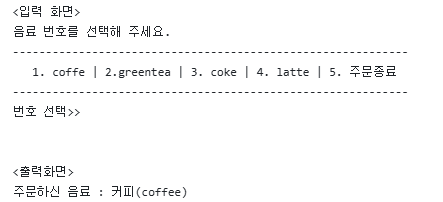
package day03.contion;

import java.util.Scanner;

//1. if ~ else if ~ else와 nextInt()사용
public class If4 {
    public static void main(String[] args) {
        //1. 입력 준비
        Scanner scan = new Scanner(System.in);

        //2. 변수 선언 - 지역 변수(local variable):스택
        int order = 0; //주문 번호
        String orderMenu = ""; //주문 음료
        //String msg = "음료 번호를 선택해 주세요.";

        //3. 입력 받기 -
        // 메시지 -> 입력된 값(힙)을 꺼내서 스택에 있는 변수에 담기
        System.out.println("음료 번호를 선택해 주세요.");
        System.out.println("-----------------------------------------------------");
        System.out.println("1.coffee | 2.greentea | 3.coke | 4.latte | 5.주문종료");
        System.out.println("-----------------------------------------------------");
        System.out.print("번호 선택>> ");
        order = scan.nextInt();

        //4. 판별
        if(order == 5){
            System.out.println("주문 종료를 선택하셨습니다.");
            return;
        }

        if(order == 1){
            orderMenu = "커피(coffee)";
        }else if(order == 2){
            orderMenu = "녹차(greentea)";
        }else if(order == 3){
            orderMenu = "콜라(coke)";
        }else if(order == 4){
            orderMenu = "라떼(latte)";
        }else{
            //System.out.println("입력 오류, 다시 입력해주세요.");
            orderMenu ="입력 오류";
        }

        //5. 출력
        System.out.println("주문하신 음료 : " + orderMenu);

    }//end main
}//end class
package day03.contion;

import java.util.Scanner;

//2.Switch문, next(), nextLine()으로 받아서 처리
// 문자열 비교는 equals()
public class Switch {
    public static void main(String[] args) {
        //1. 입력 준비
        Scanner scan = new Scanner(System.in);

        //2. 변수 선언 - 지역 변수(local variable):스택
        String order = ""; //주문 번호
        String orderMenu = ""; //주문 음료
        //String msg = "음료 번호를 선택해 주세요.";

        //3. 입력 받기 -
        // 메시지 -> 입력된 값(힙)을 꺼내서 스택에 있는 변수에 담기
        System.out.println("음료 번호를 선택해 주세요.");
        System.out.println("-----------------------------------------------------");
        System.out.println("1.coffee | 2.greentea | 3.coke | 4.latte | 5.주문종료");
        System.out.println("-----------------------------------------------------");
        System.out.print("번호 선택>> ");
        order = scan.nextLine();

        //4. 판별
        if(order.equals("5")){
            System.out.println("주문 종료를 선택하셨습니다.");
            //return; //메서드를 빠져나가기
            System.exit(0); //시스템을 종료
        }//end if

        switch (order){
            case "1":
                orderMenu = "커피(coffee)";
                break;
            case "2":
                orderMenu = "녹차(greentea)";
                break;
            case "3":
                orderMenu = "콜라(coke)";
                break;
            case "4":
                orderMenu = "라떼(latte)";
                break;
            default:
                orderMenu = "입력 오류";
        }//end switch

        //5. 출력
       System.out.println("주문하신 음료 : " + orderMenu);


    }//end main
}//end class
댓글